



The Legend of Zelda: Tears of the Kingdom is probably the most complex Zelda game to date, as it builds even more on top of the already pretty layered BOTW to create one of the biggest games ever made. For a game with so many mechanics, it can get a little overwhelming in terms of controls, but luckily you have some options.
Speaking of options, that’s where you want to go for some basic tweaks to how TOTK plays. Either from the Title Screen or by pressing +, head over to Options, then scroll down until you reach Swap Jump Controls. This setting allows you to assign jump to B and dashing and other actions to X. The only other control setting currently available in TOTK is whether to turn off aiming with motion controls.

However, the Switch does allow you to remap the buttons on your controller, meaning that if you’re a bit stumped by crouching in TOTK being mapped to L3, you’re in luck.
From the Switch home screen, go to System Settings (the cog icon). Scroll all the way down to Controllers and Sensors, then select Change Button Mapping.
On this screen, all of your paired controllers will be available, including the Joy-Con and Pro Controller. Select the controller you are going to use to play TOTK, then select Change.
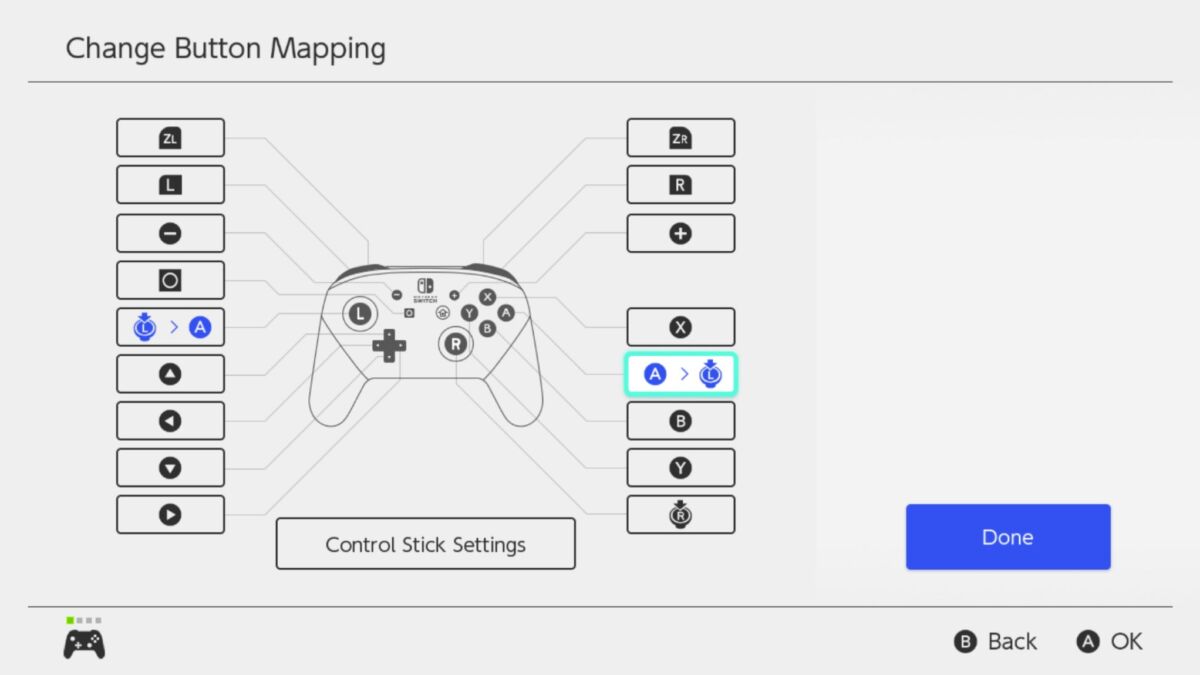
Here, you can swap buttons around and remap your controls, but bear in mind that you cannot have buttons with double functions and also that it’s active as soon as you save it.
You can even save a profile to swap to whenever you’re playing TOTK if you like. Just start changing controls and then save it as preset, even with the ability to give it a name. It’s a bit of a headache to figure it out, but it might be worth it in the long run when you’re playing TOTK.
The Legend of Zelda: Tears of the Kingdom is available now on Switch.
READ NEXT: Zelda: Tears of the Kingdom – Can You Change Difficulty?
Some of the coverage you find on Cultured Vultures contains affiliate links, which provide us with small commissions based on purchases made from visiting our site.
