


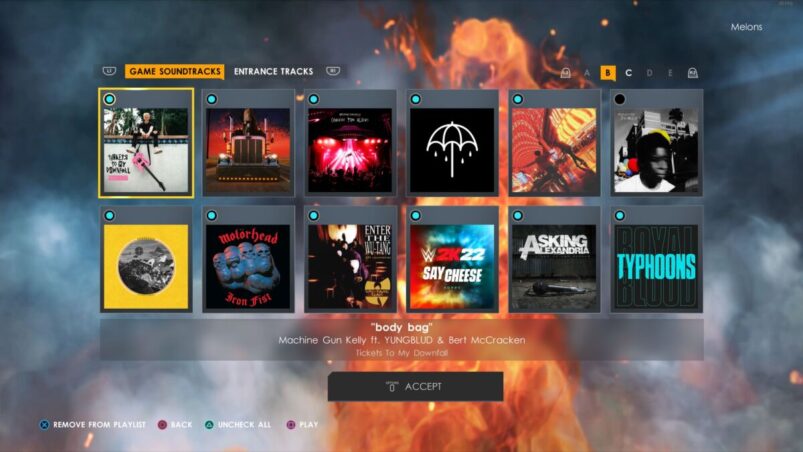
WWE 2K22 has a soundtrack from MGK that might not be to everyone’s liking, but luckily you can customise the tracks to turn off ones that you don’t like and even add some that you maybe didn’t know about.
To change the soundtrack in WWE 2K22, go to Options > Jukebox.
In here, you can turn on and off the 12 licensed songs that you want or don’t want to listen to. If you press R1/RB, you can even add entrance themes from the roster at your disposal. These sadly aren’t the whole songs and are more like 1-2 minute long snippets, but they’re good to break up the licensed songs.
Unfortunately, there seems to be no way of ordering or even turning off shuffle in 2K22, neither does there seem to be a button to skip a track while navigating menus or in a specific mode.
WWE 2K22 is available on PC, PS5, PS4, Xbox Series X & S, and Xbox One.
READ NEXT: WWE 2K22: 10 Things You Should Know
Some of the coverage you find on Cultured Vultures contains affiliate links, which provide us with small commissions based on purchases made from visiting our site.
