



Desperados 3 is a game all about trying, dying, and then trying again. It’s a game so much about slow progress that you should probably be wearing out the quick save button. The game knows this and tells you to quick save pretty constantly.
While this is a handy reminder, it can get a little annoying to have a prompt flash up on screen on a very regular basis. There’s an easy way to disable quick save in Desperados 3, though.
All you need to do is go to the options menu and then select gameplay on the left side of the screen. Scroll down until you see “save reminder“.
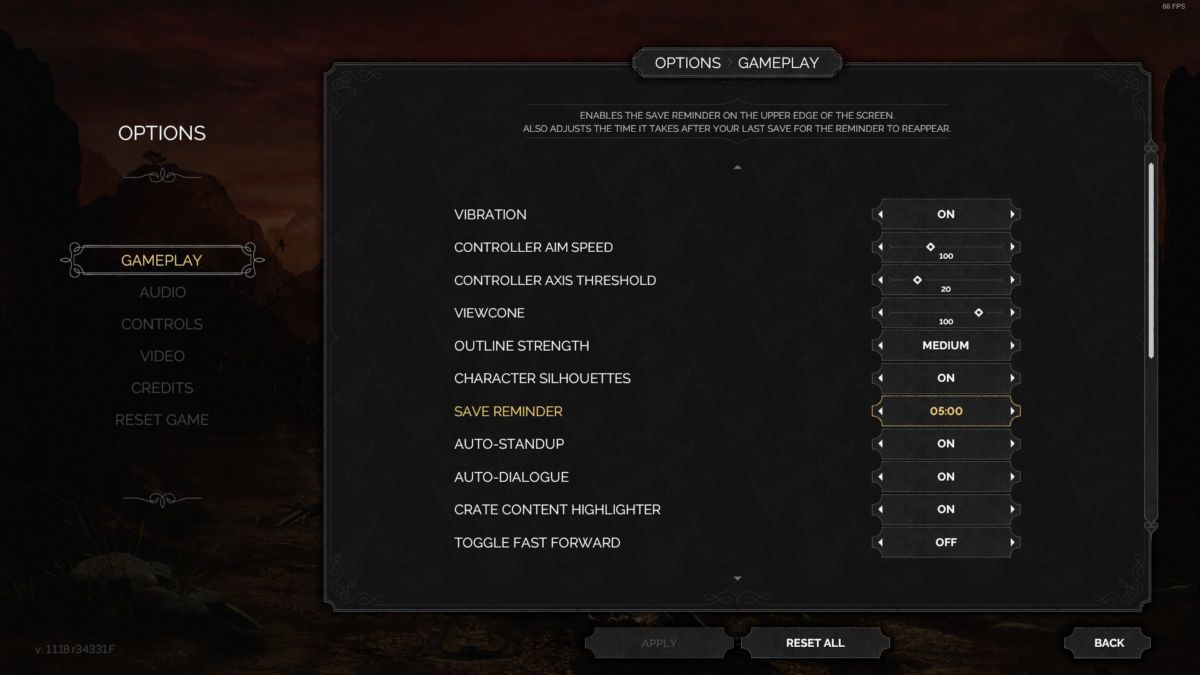
From here, you can make save reminders appear every minute, 5 minutes, 10 minutes, or not at all. If you’re trying to speedrun the game, which is easier said than done, you will likely want to to turn this setting off completely.
Quick saving should become second nature to you, though, without the need for a prompt. Our beginner’s tips suggest quick saving even after the smallest of gains.
Desperados 3 releases for PC, PS4, and Xbox One on June 16th. From our review:
“Featuring a beefy campaign, charming characters, and a daunting yet captivating difficulty, Desperados 3 brings the franchise hooting and hollering back to life — and maybe better than ever.”
Some of the coverage you find on Cultured Vultures contains affiliate links, which provide us with small commissions based on purchases made from visiting our site.
