


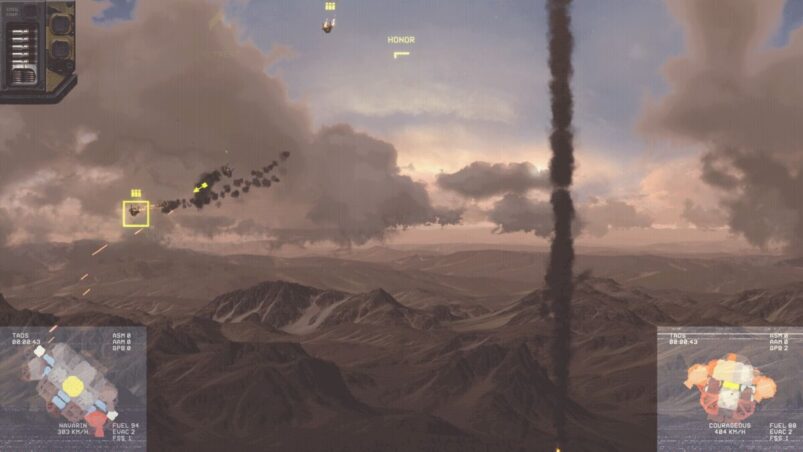
HighFleet’s user interface can be quite intimidating and confusing at times, especially in the fast-paced combat mode with ships flying and missiles exploding everywhere. To help clear up some of the confusion and better prepare for the intense combat, we prepared a handy guide on the game’s tactical UI.
Here are the main elements of combat in HighFleet:
– Active Systems
– Friendly Tracking
– Enemy Tracking
– Battlefield
– Movement
– Weaponry
– Countermeasures
And here’s everything you need to know about the tactical combat in HighFleet.
Active Systems
The active systems portion of the tactical UI can be found in the top-left corner of the screen. These elements will fade out depending on player use and if a ship ends up flying under the UI.
The active systems UI includes countermeasure charges, primary and secondary ammo tracking, fire extinguisher charges, and proximity signals for missiles and burning engines. These elements will rapidly change throughout combat and it’s wise to maintain a high degree of attention on these elements.
Friendly Tracking
In the bottom left of the screen, players will find their ship status UI. Here they will get a color-coded readout of any damaged components, ammo for various missiles and heavy ordnance, as well as a fuel readout. Though helpful, this portion of the UI gets the most audio cues, which allows players to focus their attention elsewhere.
Enemy Tracking
On the bottom right of the screen, players will have an almost identical readout to their own ship readout, but this one element is for the enemy. Admirals will get the same color-coded readouts and fuel information as their own ship, however, for the enemy ship tracker to be active, players will need to make sure that their targeting arrow is pointing in the direction of an enemy ship to get a reading.
Battlefield
The rest of the screen is taken up by the battlefield UI, which is where all the explosive action takes place. The player-controlled ship will always be indicated by a light-green box, rectangle, or circle. Just above their ship, players will find the expanding engine temperature bar, which will become red if they begin to overheat (an audio cue will also give notice). Moreover, a large prominent arrow indicates the direction of the mouse, with a smaller arrow representing the direction of the ship’s weapons.
In addition, the entire screen will darken if players use afterburners for too long or make crazy maneuvers to replicate the effect of gravity-related loss of consciousness, though this is really just relevant for most of the faster, smaller, and maneuverable ships.
Only targeted enemy ships will be indicated by a green box. Green circles as well as a low-pitch beeping audio cue will designate incoming missiles and other heavy ordnance.
Finally, players will find a large arrow labelled “Retreat” usually in one of the four corners of the screen indicating where their currently controlled ship can go to withdraw from combat. If there are additional friendly ships waiting to join combat, they will generally spawn on the opposite side from where the previous ship retreated.
Movement
Moving around will be the first and most important element of combat (don’t forget about landing). While it may not be necessary to always have engines and thrusters going at full blast, being able to maneuver at the critical moment to take advantage of a split-second opening is vital for victory.
WASD controls the main directions of thrusters: up, left, down, and right respectively. Ships can also rotate with the Q, counterclockwise, and E, clockwise, however, these will be least useful, as most ships either rotate themselves (if they’re small enough) or they benefit from staying stable. The rotational thrusters are most useful in landing sequences so it’s still important to get used to using them.
Arguably the most important movement command is the activation of afterburners. The left shift key will put the engines on full thrust and give the ship a massive boost in speed, which can be vital for dodging heavy artillery or even missiles.
The afterburners will stay on for as long as the player holds the Shift key. Be wary, however, keeping them on for too long will burn through fuel really quickly and may overheat the engines to the point of setting them on fire.
Weaponry
Firing and activating weapons of all sorts is the second most important element of combat. All ships will have a primary weapon, fired with the left mouse button, and the secondary weapon will fire with the right mouse button, if available.
Many ships also carry an assortment of special weapons and heavy ordnance, such as anti-ship missiles (ASM), anti-air missiles (AAM), and bombs. ASMs fire with the space key and will hone in on the current or last locked target. They can be shot down with most weapons or even dodged.
AAMs activate with the C key and these missiles only target fast-moving aerial targets, such as missiles of various kinds and attacking aircraft. Bombs launch after clicking and holding the mouse wheel to bring up the bomb drop path, lining up the drop, and then releasing the mouse wheel to release the bomb. Bombs are the trickiest to use as combat is all about speed, but in specific situations and for busting ground targets, bombs can be useful.
Countermeasures
The two main countermeasures for most ships are flares and fire extinguishers. Flares are the premier active mode of defence against ASMs, aside from dodging or shooting at them, and they launch with the F key. Fire extinguishers are used to put out engine fires and activate with the B key. Be wary that the bigger the ship, the greater the chance of multiple fires, so multiple extinguisher uses may be needed to put out all flames.
Combat is undoubtedly a fun, but daunting experience in HighFleet due to how busy it can get on screen, especially with many enemies trying to shoot the player’s ship down. Equipped with this handy guide, admirals and pilots will find jumping into the cockpit and defeating enemies on a regular basis far easier.
The game’s pulse-pounding action leaves little time to get a perfect read on the tactical situation as a whole, but most of the relevant UI elements are implemented in such a way to give players an at-a-glance read of the battle when there is a brief moment to breathe and reassess. The challenge now for pilots and admirals is to use their knowledge of all the major combat systems to come up with the most effective way to defeat their enemies.
HighFleet is available for PC.
READ NEXT: The Best Grand Strategy Games of All Time
Some of the coverage you find on Cultured Vultures contains affiliate links, which provide us with small commissions based on purchases made from visiting our site.
