



Quick one for you here: sick of looking at the really grumpy guy as your chosen soldier in your Battlefield 6 profile, even though you never chose him? Well, luckily you can swap him out. But, for whatever reason it’s been made about as intuitive as trying to make a dog hatch an egg.
So, ideally from the main menu, go to Loadouts and then choose the class you want to be on your profile. Select it, make sure you set the skin you want (don’t forget faction, too), then hover on a loadout in the bottom left corner. If you’ve not made any of your own, it will just be called “Loadout 1.” Press I if you’re on keyboard to highlight on profile and ta-da, you have set your profile soldier/skin to the one you actually want.
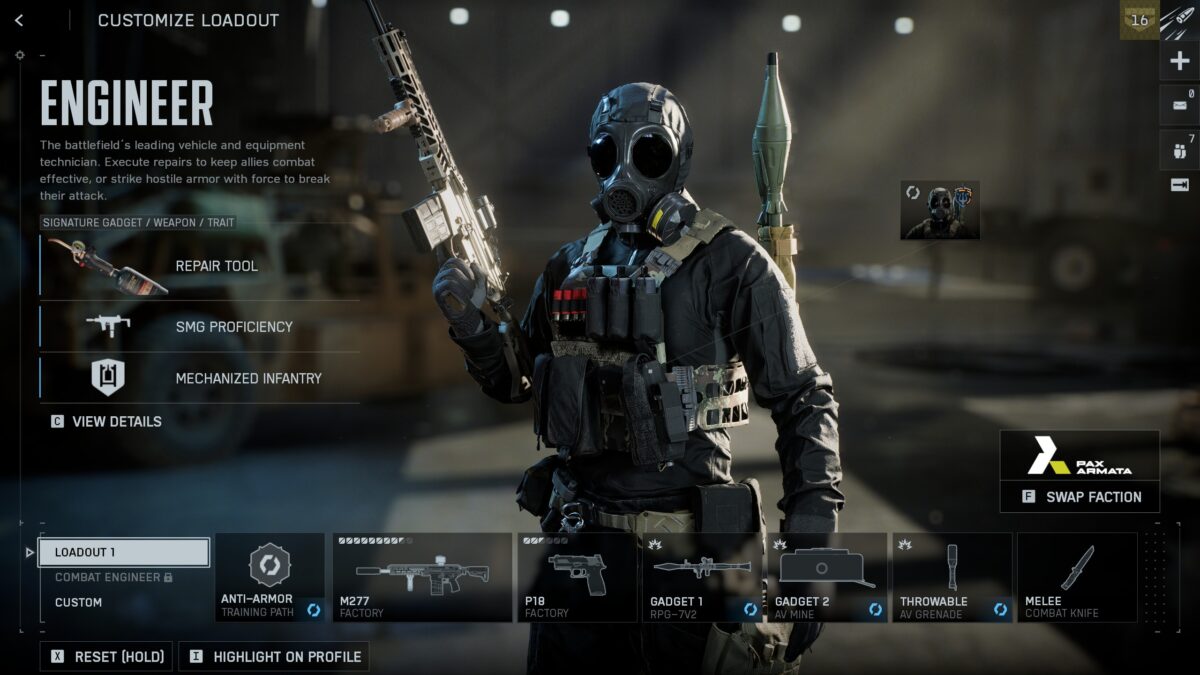
Behold, the fruit of my Battlefield 2042 labours.
I’ll be honest, as much as I am definitely enjoying Battlefield 6, this honestly has to have one of the worst UIs for a AAA game I’ve ever seen. Nothing feels like where it should be and everything seems to take more clicks than makes any sense. Hopefully we’ll get some kind of update to it in the future.
READ NEXT: Fortnite x The Simpsons: Everything You Need To Know
Some of the coverage you find on Cultured Vultures contains affiliate links, which provide us with small commissions based on purchases made from visiting our site.
