



For those of you who have managed to live more than a week and desperately want to cling to your well-earned mortality, a new Project Zomboid update doesn’t have to end your existing Build 41 run. The developer maintains a Steam branch for players who want to keep using that version.
Is Build 42 Still Unstable?
Build 42 is now available on the stable branch. Build 42.20 launched there on 29 July 2026, and 42.21 subsequently moved to stable on 28 September 2026. This is now the default branch when you buy and install the game.
The official website lists 42.21 for both Stable and Unstable. Older instructions saying you must opt into Unstable just to play Build 42 are therefore out of date. So how do you go back in time, as it were?
How Do You Select Build 41 on Steam?
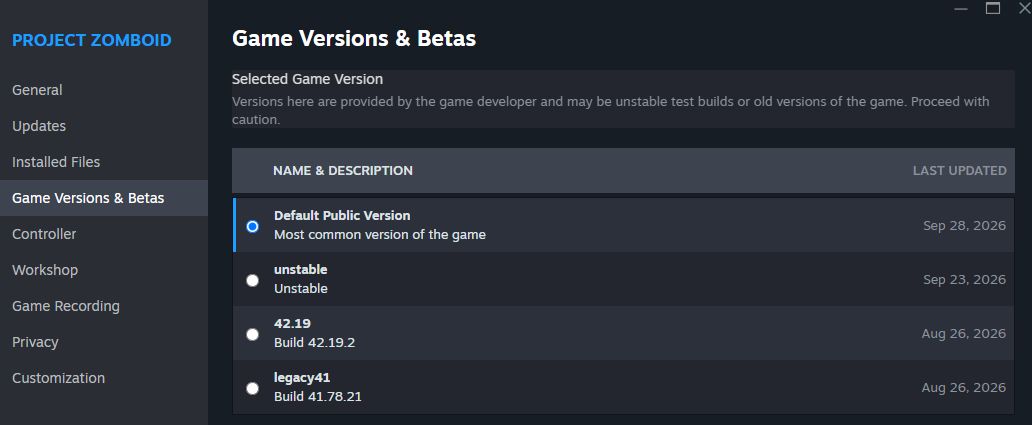
Close the game, then:
– Find Project Zomboid in your Steam Library.
– Right-click it and select Properties.
– Open Game Versions & Betas.
– Select legacy41.
– Let Steam finish updating before launching.
This is the developer’s official route for both solo players and people continuing on Build 41 servers. You don’t need a second purchase.
Before changing branches, keep a separate backup of the save you want to preserve. When you launch, check that you’re running the intended build before loading your world.
Bear in mind that this version may not be available forever.
Will Your Build 41 Save Work in Build 42?
No. Stay on Build 41 to continue that world. The developer explicitly confirmed the incompatibility ahead of Build 42’s stable release.
Keep the old save and start a separate world when you want to try Build 42. Reinstalling the game won’t remove the underlying version incompatibility.
For multiplayer, check which build your server uses before changing your client. The official legacy instructions cover server owners and their players, so coordinate the move rather than having everyone pick a different branch.
What If Your Save Uses Build 42.19?
Ah, that has its own exception. Saves from Unstable 42.19 are incompatible with 42.20 because of additional map content.
The developer’s best option for finishing those runs is the 42.19 branch in the same Steam menu. Use legacy41 for a Build 41 world and 42.19 for that older Build 42 world. Choosing whichever label looks oldest is not much of a backup strategy.
READ NEXT: Consoles That Failed (And Didn’t Deserve To)
Some of the coverage you find on Cultured Vultures contains affiliate links, which provide us with small commissions based on purchases made from visiting our site.