


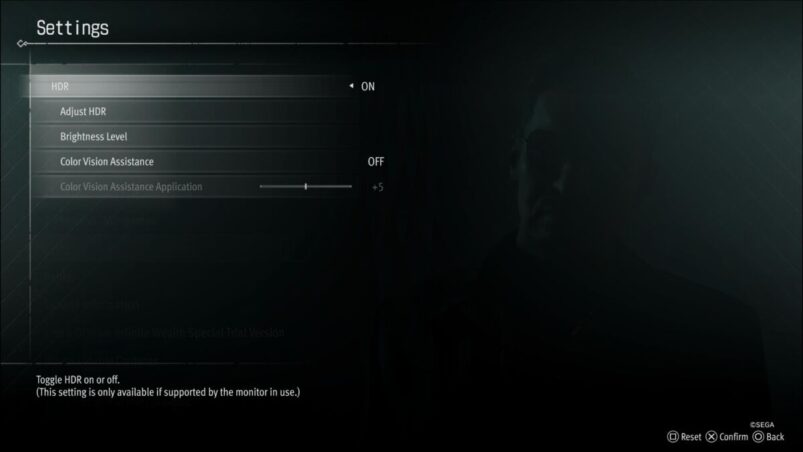
The fictional district of Sotenbori has always been one of the most beautiful locales in the Like A Dragon series, with its iconic river and neon lights, but if you want to get the most out of its visual splendor, you’re going to want to enable HDR. Fortunately, Like A Dragon Gaiden: The Man Who Erased His Name features HDR as standard, but you’ll need to dig through the settings in order to find it.
If you want to enable HDR in Like A Dragon Gaiden: The Man Who Erased His Name, you need to head to Settings > Display Settings and from there, you’ll see the option to turn HDR on or off. If you turn the option on, you’ll be able to adjust the settings manually for maximum light and dark, ensuring the visuals look as good as possible for your specific display or platform.
For some people when checking this setting, it’s possible that the HDR option will be greyed out, which could mean that you either need to enable HDR on your platform of choice, or it needs to be enabled on the display you’re using. While we can’t walk you through enabling HDR on every display ever made, enabling HDR on PC and consoles isn’t too hard.
For those on PlayStation 5, you need to go to Settings > Screen and Video > Video Output > HDR, and there you can tinker with the settings to find what’s right for you. As for PS4 owners, go to Settings > Sound and Screen > Video Output Settings and then select Automatic.
Xbox users have it a bit easier, as the UI for both Xbox One and Xbox Series X & S is the same. Those in this camp need to go to Profile & system > Settings > General > TV & display options > Video modes > Allow HDR10. You can tinker with the settings further here too.
For PC, simply searching HDR in Windows to find the settings should work if you’re on more recent Windows versions, or just go to Settings > System > Display > HDR and go from there.
If HDR is still not working properly in Like A Dragon Gaiden: The Man Who Erased His Name, it’s more than likely that you’re on a display which doesn’t support HDR, or hasn’t enabled the mode yet. Check through your display settings. Also, it’s worth baring in mind that if you’re planning on capturing screenshots or footage, HDR can make the captures look different from when you’re playing.
Like A Dragon Gaiden: The Man Who Erased His Name is available now on PC, PS4, PS5, Xbox One and Xbox Series X & S.
READ MORE: Like A Dragon 8 Goes Full Animal Crossing, Which Is Silly & Awesome
Some of the coverage you find on Cultured Vultures contains affiliate links, which provide us with small commissions based on purchases made from visiting our site.
