



Grand Theft Auto 6 represents a game of change for the GTA series. Enemy dots on the mini-map are gone, there’s no giant “Mission Passed” screen, and you don’t have to absolutely obliterate your thumbs to sprint anymore. But if you want to do that, there is an option for you on both PlayStation 5 and Xbox Series.
To change back to GTA 5 controls in GTA 6, simply pause the game > Settings > Control Scheme, and then switch the Control Scheme to Classic (the second option).
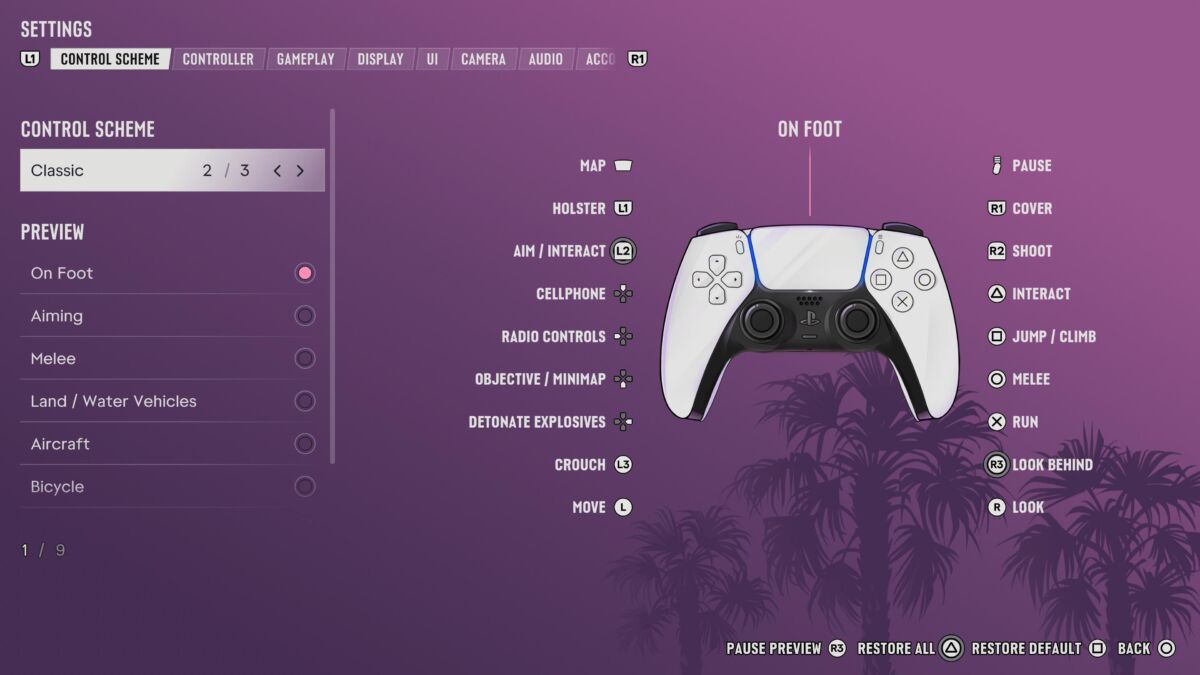
This not only puts sprinting back to X/A, but also makes jumping return to square X and crouch back to L3 instead of circle/B. Personally, I do much prefer the newer controls, even if they still aren’t perfect. Still, if you’ve been playing previous game this way for the last 13 years, I guess you just kind of get used to things the way they are (and also obliterating your thumbs). Sadly, there’s no way of custom mapping every button on the controller, which is a pity. Guess we’ll have to wait until the PC release.
If you’re tired of sprinting around, here’s how you can get your hands on one of the rarest cars in the game.
Grand Theft Auto 6 is available now on PS5 and Xbox Series X and S.
READ NEXT: Grand Theft Auto 6 (PS5) REVIEW
Some of the coverage you find on Cultured Vultures contains affiliate links, which provide us with small commissions based on purchases made from visiting our site.