


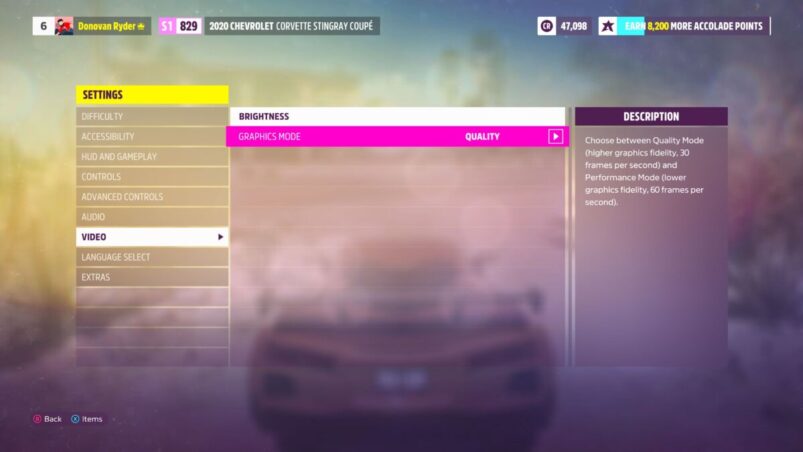
For many, Forza Horizon 5 is just another racing game, but for Xbox Series X | S owners, it’s perhaps the first big opportunity to really flex the power of the new hardware, whether that’s visually with impressive graphics, or in terms of smooth performance. Luckily, Forza Horizon 5 caters to both, with different modes to cater towards your own personal preferences.
Here’s how to change the visual mode in Forza Horizon 5.
Forza Horizon 5’s Visual Modes
You can tinker with the game’s visual modes from as early as the press start screen, as you can press X there to view the options and accessibility modes before loading up the game itself. If you’d rather change your settings in-game, you can also do so within the game’s pause menu, under settings on the Home tab.
Forza Horizon 5 has two visual modes for PC and Xbox Series X | S: fidelity and performance, which varies depending on the platform you’re playing on. For Xbox Series X and high-end PC players, both visual modes will run at 4K, with fidelity aiming for 30fps with improved textures, reflections and lighting, while performance will remove those enhancements in favour of a 60fps target.
For Xbox Series S players, the fidelity mode shoots for 1440p and 30fps, while the performance sits at 1080p and runs at 60fps. As for players who haven’t yet upgraded to the new hardware, Xbox One players only have one mode, though depending on their console version, it has different outputs.
Xbox One X runs at 4K and 30fps, with comparable visuals to the Series X | S in performance mode, while base Xbox One and One S players will experience the game in 1080p at 30fps. The performance is reportedly solid, but with reduced NPCs and draw distance to compensate.
Forza Horizon 5 is available on PC, Xbox One, and Xbox Series X | S.
READ NEXT: Forza Horizon 5: How To Change Difficulty
Some of the coverage you find on Cultured Vultures contains affiliate links, which provide us with small commissions based on purchases made from visiting our site.
